
- Film & Animation
- Music
- Pets & Animals
- Sports
- Travel & Events
- Gaming
- People & Blogs
- Comedy
- Entertainment
- News & Politics
- How-to & Style
- Non-profits & Activism
- Religion & Spiritual
- Health Natural Remedies
- Gardening +
- Arts & Crafts
- Action
- Hair & Beauty
- Hunting & Survival
- Shopping & Reviews
- Motivational & Self Help
- Jesus
- Marriage
- Live TV
- Programing & Coding
- Latest & Gadgets
- Make You Own
- Unexplained & Stange
- Jesus Christ
- Food & More
- Other
Gardening +


Dave shows you how you can set up an electronics lab for only a few hundred bucks.
Multimeter, oscilloscope, power supply, function generator, soldering station, solder, wire, tools, microscope and magnifier, and components.
The prevous video: https://www.youtube.com/watch?v=R_PbjbRaO2E
Forum: http://www.eevblog.com/forum/b....log/eevblog-954-how-
Links:
UT136B: http://amzn.to/2hjEmF5
OWON VDS1022I USB Oscilloscope: http://amzn.to/2hguCer
YiHUA 936 Soldering Station: http://amzn.to/2hjHkcV
Hakko Tips: http://amzn.to/2gnhcvm
Lab PSU: http://amzn.to/2gN3AuD
USB Microscope: http://amzn.to/2hjFdpn
Head Magnifier: http://amzn.to/2gN4uqS
Flux Pen: http://amzn.to/2gnf8Ub
0.3mm solder: http://amzn.to/2hjIwx0
Lead Free solder: http://amzn.to/2hjMF45
If your budget allows: Rigol DS1054Z: http://amzn.to/2gN7JPg
EEVblog Main Web Site: http://www.eevblog.com
The 2nd EEVblog Channel: http://www.youtube.com/EEVblog2
Support the EEVblog through Patreon!
http://www.patreon.com/eevblog
EEVblog Amazon Store (Dave gets a cut):
http://astore.amazon.com/eevblogstore-20
T-Shirts: http://teespring.com/stores/eevblog
💗 Likecoin – Coins for Likes: https://likecoin.pro/@eevblog/dil9/hcq3


The latest installment in our education series gives you a quick guide to electronic switch types and their functions. Hope that this is really useful! We had a ton of fun making it! Subscribe for more videos.
00:00 - 01:40 Introduction to Switches
01:41 - 03:25 Tact Switches and Limit Switches Overview (Single Pole Switches)
03:25 - 05:25 Dual Pole Single Throw Switches (Multi Pole Switches)
05:25 - 07:05 Double Pole Double Throw Switches
07:06 - 09:02 Stacking Switches & Circuit Indicators
09:03 - 09:42 End Soldering Switches
We really hope that you find these videos useful.
If you have any comments or questions, please let us know.
You can find our full product range on Amazon here:
We have been manufacturing soldering irons for 3 decades. If you think you have seen our products with a different brand on them, don't be surprised. We made them here in Taiwan for those huge brands..
50K
http://www.amazon.com/dp/B085T4M9T5?r...
90K
http://www.amazon.com/dp/B085TDQMXW?r...
110K
http://www.amazon.com/dp/B085TB18HS?r...
120K
http://www.amazon.com/dp/B085TBJ8L9?r...
150K
http://www.amazon.com/dp/B085T9YKB7?r...
Lithium Ion Rechargeable Soldering Iron
25LK
http://www.amazon.com/dp/B085T5DMPX?r...
Please also check out our website to have a look at our full range of products.
https://pro-iroda.com/

Recent playlist https://www.youtube.com/playli....st?list=PLsAJMThMEUt
List of my videos https://www.youtube.com/c/electronzap/videos
https://www.patreon.com/electronzap
https://www.amazon.com/shop/electronzapdotcom As an Amazon Associate I earn from qualifying purchases. Americans should check out one or more of those links before making any purchases. There's no extra cost to you.
https://electronzap.com/
https://www.reddit.com/r/ElectronicsStudy/

Learn how to open electronics for circuit bending in this video series that will help you understand how and when to utilize this unique way of making music.
Expert: Lorin Parker
Contact: www.electricwestern.com
Bio: Lorin Parker is renown as an instrument builder. He works as an artist, audio engineer and instructor in sound and audio as a faculty member at the Art Institute of California, Los Angeles.
Filmmaker: Louis Nathan

Links that support this channel.
GoFundMe https://www.gofundme.com/f/hel....p-fund-learning-elec
Paypal https://www.paypal.com/paypalme/electronzap
Patreon https://www.patreon.com/electronzap
Links that help me make learning electronics videos are below.
https://www.youtube.com/c/electronzap/videos
https://www.amazon.com/shop/electronzapdotcom As an Amazon Associate I earn from qualifying purchases. Americans should check out one or more of those links before making any purchases. There's no extra cost to you.
https://electronzap.com/
https://www.reddit.com/r/ElectronicsStudy/
https://www.twitch.tv/electronzap I now do my gaming, Fallout 4 for the time being, on Twitch.
Series for more voltage. Parallel for more current. I explain how to connect batteries for more power.
#battery #electronics #voltage
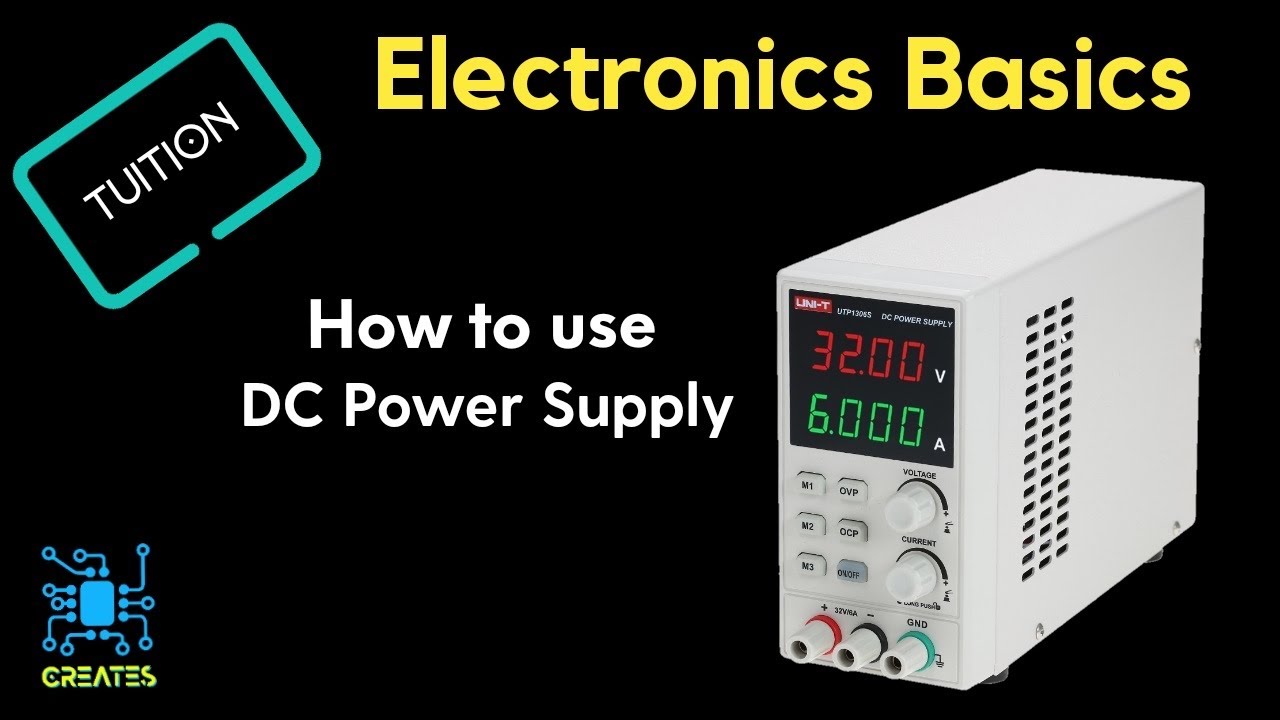
#Creates #Powersupply
in this video, we will show you how power supplies work, features and capabilities.
this is good for people who want to know how to use and when to use.
https://www.uni-trend.com/html..../product/NewProducts
Music:April showers

Check out this video on how to clean battery corrosion out of toys and electronics! If you’re like me, you forget batteries in things for long amounts of time or have small electronics that have had leaks.
No fear! I’m here to teach you how to save them! I’m way too cheap to just trash these items when it’s so simple to use vinegar to clean them up. ☺️💰
#electronics #batterycorrosion #diycleaning #lifehacks #cleaningtricks #cleaninghacks #frugalliving
https://hobbyhomestead.com/diy....-electronics-care-re


The first analog multimeter was invented by Donald Macadie, a British Post Office engineer, in the 1920s.
Macadie was frustrated with having to carry multiple tools for testing telecommunication circuits. He created a single device that could measure amperes (amps), volts, and ohms, which led to it being named the avometer.
The original avometer was bulky compared to today's digital multimeters, but it became more portable and featured additional ranges and functions by the 1930s.
👌
Testing electronic components is crucial for several reasons:
- Ensuring Functionality: Testing verifies that components work as intended, meeting specifications for voltage, current, resistance, etc. This ensures the overall circuit or device functions correctly.
- Identifying Defects: Testing helps detect faulty components before they cause problems in the circuit. This prevents malfunctions, reduces repair costs, and improves product reliability.
- Quality Control: In manufacturing, testing ensures consistent quality across production batches. This helps identify and address manufacturing inconsistencies, leading to reliable products.
- Troubleshooting: Testing helps isolate the source of problems in existing circuits. By testing individual components, technicians can pinpoint the faulty element and replace it, minimizing downtime and repair costs.
- Design Optimization: Testing provides valuable data for circuit designers. By evaluating component performance under various conditions, designers can optimize circuit design, improve efficiency, and reduce power consumption.
- Safety: Testing ensures that components meet safety standards, preventing electrical shocks, fires, or other hazards caused by faulty components.
In short, testing electronic components is essential for ensuring product quality, reliability, safety, and efficient operation.
Helpful Links:
• Testing electronics components in Circuit using digital multimeter: https://youtu.be/DFNSlOvuSu0?si=AO4_ry1JpwAhpqS3
•How to test IGBT?:
https://youtu.be/EewVdJ79KQI?si=7DZqgYXm_mJoAycv
•Adjustable Shunt Voltage regulator:
https://youtu.be/BZiLLqNDPg8?si=bkgVCDqiZd9L_Ea9
•Ano ang linear regulators:
https://youtu.be/bNXPVLLb45U?si=WTroE4x-jbcl0ugg
• Ano ang Inductor?
https://youtu.be/k9a8KoAirHo?si=rjtPF5Ul9Hvge6Sl
• How to Test P-Channel MOSFET?
https://youtu.be/j1vW4TsKc8U?si=QhUJoquhCadwnOOj
• Mga dapat mong malaman sa Capacitor
https://youtu.be/Iv3yFP-XN9I?si=Mi0JMCnS1fWFNOM4
• Mga dapat mong malaman sa Resistor
https://youtu.be/Mot-0ftAgoo?si=TZAMlgXkXUiR5pTQ
• Dapat mong malaman sa BJT transistor
https://youtu.be/lEtrZdW_ZT4?si=L7xQDOngAth2Bbc5
Video Chapter:
0:00 Intro
0:54 Tips No.1 in testing electronics components in Circuit
01:27 Tips No.2 in testing electronics components in Circuit
01:57 Tips No.3 in testing electronics components in Circuit
03:26 Tips & Advice in testing FUSE
05:20 DON'T SKIP THIS IMPORTANT REMINDER!!
09:22 Testing CAPACITOR
19:21 Testing DIODE
28:12 Testing POTENTIOMETER
34:41 Testing PUSH-BUTTON SWITCH
36:37 Testing a RELAY
42:10 Testing a REGULATOR
51:04 Testing an Integrated Circuit (I.C.)
57:51 Testing a TRANSISTOR
01:07:27 Testing a Resistor (with Tips and Important Reminders)
StayHumble & Be Creative


A datasheet serves as the user manual for a particular electronics component. In this video, @BeckyStern covers how to read a datasheet and shares what all those charts, tables, and specs actually mean. It’s less scary than it looks!
Whether you’re picking the right resistor for an LED or figuring out how not to fry your microcontroller, this video is for you. Learning to read datasheets will make you a lot more confident when selecting parts for your next project, and it marks a pretty big jump from beginner-level electronics skills to intermediate.
https://www.digikey.com/en/mak....er/tutorials/2024/ho
Electronics with Becky Stern playlist: https://www.youtube.com/playli....st?list=PLEBQazB0HUy
Product Links:
● Red LED - https://www.digikey.com/en/pro....ducts/detail/marktec
● PIR motion sensor - https://www.digikey.com/en/pro....ducts/detail/adafrui
● Arduino Nano ESP32 - https://www.digikey.com/en/pro....ducts/detail/arduino
Related Videos:
Arduino Basics - Electronics with Becky Stern - https://youtu.be/zfp0IJoXcFg
Arduino Input/Output - Electronics with Becky Stern - https://youtu.be/iw63hngE75g
Arduino Libraries - Electronics with Becky Stern - https://youtu.be/9sVT5l_-2-g
Your First Arduino Project - Electronics with Becky Stern - https://youtu.be/v1yuuNpjCLk
Arduino Errors and Troubleshooting - Electronics with Becky Stern - https://youtu.be/cZ0LObhTQiQ
From Solderless Breadboard to Soldered Circuit - Electronics with Becky Stern - https://youtu.be/F9Krq7seV1g
Easy Ways to Connect your Project to the Internet - Electronics with Becky Stern - https://youtu.be/0pfQbyoIpgA
Creating Project Enclosures - Electronics with Becky Stern - https://youtu.be/lAjmVMYUelA
Documenting Your Electronics Projects - Electronics with Becky Stern - https://youtu.be/BqhyTr8-55s
Arduino Sleep and Interrupts - Electronics with Becky Stern https://youtu.be/oX9T2bvE2Qs
Arduino without Delay() - Electronics with Becky Stern https://youtu.be/JnSt0vylnp4
AI Vision Modules - Electronics with Becky Stern https://youtu.be/UXiLq1Igxxg
Arduino vs. Raspberry Pi - Electronics with Becky Stern https://youtu.be/XLr80pUsoEA
Getting Started with Arduino IoT Cloud - Electronics with Becky Stern - https://youtu.be/NjXLZP_0HM8
How to pick the best microcontroller for your project - https://youtu.be/OFKxVTKmafU
Automotive Sensors - Electronics with Becky Stern - https://youtu.be/vAUOubx4E-A
Arduino for Artists - Electronics with Becky Stern - https://youtu.be/scG6QN0DwRA
Guide to Addressable LEDs - Electronics with Becky Stern - https://youtu.be/2tTsV290nTo
Your First PCB - Electronics with Becky Stern - https://youtu.be/FN97TGFjzUg
The Best Connectors for DIY Electronics Projects - Electronics with Becky Stern - https://youtu.be/_x751XTDJJ4
Multimeters - Electronics with Becky Stern - https://youtu.be/DLO1LMjQN34
Introduction to Electric Motors - Electronics with Becky Stern https://youtu.be/hAim95A7psA
Benchtop Power Supplies - Electronics with Becky Stern https://youtu.be/h0JI9N2YI0Y
Maker.io - https://www.digikey.com/en/maker
DigiKey’s Blog – TheCircuit https://www.digikey.com/en/blog
Connect with DigiKey on Facebook https://www.facebook.com/digikey.electronics/
And follow us on Twitter https://twitter.com/digikey
Becky’s channel: https://www.youtube.com/beckystern
00:00 Intro
00:46 What information can be found on a datasheet?
02:03 Where do you find the datasheet for your electronics parts?
03:07 Absolute Maximum Ratings
03:40 Recommended Operating Conditions
04:03 Pin Configuration / PinOut
04:40 Reading Datasheets for PCB Design
05:32 Real-World Examples for Reading a Datasheet: A Red LED
07:02 Real-World Examples for Reading a Datasheet: A PIR Sensor
08:18 Real-World Examples for Reading a Datasheet: The Arduino Nano ESP32
09:10 Reading Datasheets for Advanced Parts
10:55 Outro
A datasheet serves as the user manual for a particular electronics component. In this video, @BeckyStern covers how to read a datasheet and shares what all those charts, tables, and specs actually mean. It’s less scary than it looks!
Whether you’re picking the right resistor for an LED or figuring out how not to fry your microcontroller, this video is for you. Learning to read datasheets will make you a lot more confident when selecting parts for your next project, and it marks a pretty big jump from beginner-level electronics skills to intermediate.
https://www.digikey.com/en/mak....er/tutorials/2024/ho
Electronics with Becky Stern playlist: https://www.youtube.com/playli....st?list=PLEBQazB0HUy
Product Links:
● Red LED - https://www.digikey.com/en/pro....ducts/detail/marktec
● PIR motion sensor - https://www.digikey.com/en/pro....ducts/detail/adafrui
● Arduino Nano ESP32 - https://www.digikey.com/en/pro....ducts/detail/arduino
Related Videos:
Arduino Basics - Electronics with Becky Stern - https://youtu.be/zfp0IJoXcFg
Arduino Input/Output - Electronics with Becky Stern - https://youtu.be/iw63hngE75g
Arduino Libraries - Electronics with Becky Stern - https://youtu.be/9sVT5l_-2-g
Your First Arduino Project - Electronics with Becky Stern - https://youtu.be/v1yuuNpjCLk
Arduino Errors and Troubleshooting - Electronics with Becky Stern - https://youtu.be/cZ0LObhTQiQ
From Solderless Breadboard to Soldered Circuit - Electronics with Becky Stern - https://youtu.be/F9Krq7seV1g
Easy Ways to Connect your Project to the Internet - Electronics with Becky Stern - https://youtu.be/0pfQbyoIpgA
Creating Project Enclosures - Electronics with Becky Stern - https://youtu.be/lAjmVMYUelA
Documenting Your Electronics Projects - Electronics with Becky Stern - https://youtu.be/BqhyTr8-55s
Arduino Sleep and Interrupts - Electronics with Becky Stern https://youtu.be/oX9T2bvE2Qs
Arduino without Delay() - Electronics with Becky Stern https://youtu.be/JnSt0vylnp4
AI Vision Modules - Electronics with Becky Stern https://youtu.be/UXiLq1Igxxg
Arduino vs. Raspberry Pi - Electronics with Becky Stern https://youtu.be/XLr80pUsoEA
Getting Started with Arduino IoT Cloud - Electronics with Becky Stern - https://youtu.be/NjXLZP_0HM8
How to pick the best microcontroller for your project - https://youtu.be/OFKxVTKmafU
Automotive Sensors - Electronics with Becky Stern - https://youtu.be/vAUOubx4E-A
Arduino for Artists - Electronics with Becky Stern - https://youtu.be/scG6QN0DwRA
Guide to Addressable LEDs - Electronics with Becky Stern - https://youtu.be/2tTsV290nTo
Your First PCB - Electronics with Becky Stern - https://youtu.be/FN97TGFjzUg
The Best Connectors for DIY Electronics Projects - Electronics with Becky Stern - https://youtu.be/_x751XTDJJ4
Multimeters - Electronics with Becky Stern - https://youtu.be/DLO1LMjQN34
Introduction to Electric Motors - Electronics with Becky Stern https://youtu.be/hAim95A7psA
Benchtop Power Supplies - Electronics with Becky Stern https://youtu.be/h0JI9N2YI0Y
Maker.io - https://www.digikey.com/en/maker
DigiKey’s Blog – TheCircuit https://www.digikey.com/en/blog
Connect with DigiKey on Facebook https://www.facebook.com/digikey.electronics/
And follow us on Twitter https://twitter.com/digikey
Becky’s channel: https://www.youtube.com/beckystern
00:00 Intro
00:46 What information can be found on a datasheet?
02:03 Where do you find the datasheet for your electronics parts?
03:07 Absolute Maximum Ratings
03:40 Recommended Operating Conditions
04:03 Pin Configuration / PinOut
04:40 Reading Datasheets for PCB Design
05:32 Real-World Examples for Reading a Datasheet: A Red LED
07:02 Real-World Examples for Reading a Datasheet: A PIR Sensor
08:18 Real-World Examples for Reading a Datasheet: The Arduino Nano ESP32
09:10 Reading Datasheets for Advanced Parts
10:55 Outro
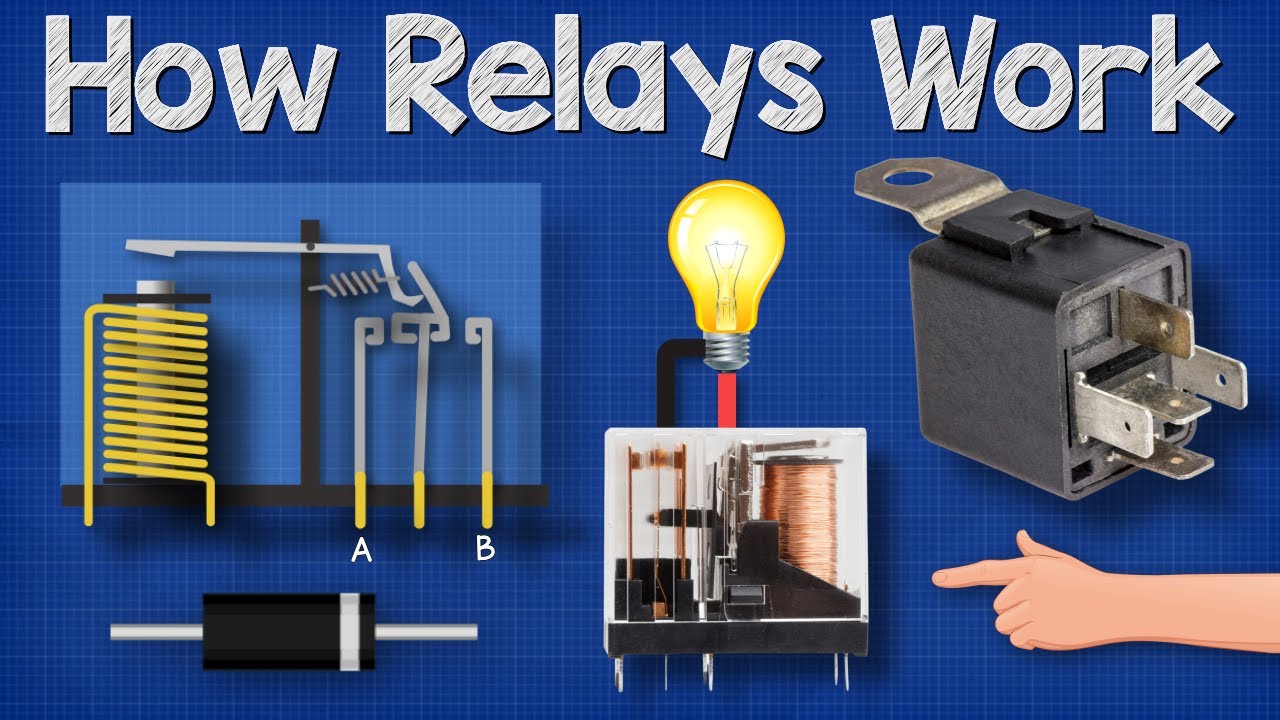
How relays work. In this video we look at how relays work, what are relays used for, different types of relay, double pole, single pole, phototransistor, solid state relay, semiconductor, flywheel diodes, 8. Suppressor diodes, DPDT, Double Pole, Double Throw Relay, Double throw relay, single throw relay, latching relay, nc, normally closed relay, no, normally open relay, Electromagnetic, electromechanical relay.
Learn more here: https://theengineeringmindset.com/how-relays-work/
TELE Controls, who have kindly sponsored this video is one of the leading manufacturers in the automation industry since 1963.
Want to learn more about TELE and its products? Simply click on the links below to get additional information on how their products can optimize and extend the lifespan of your equipment.
🎁 You can contact them at sales@tele-controls.com or LinkedIn to receive your free relay configuration cheat sheet. “
URL- https://www.tele-controls.com/....the-engineering-mind
TELE Controls Inc - https://www.tele-controls.com/
LinkedIn- https://www.linkedin.com/company/tele-controls-inc
YouTube- https://www.youtube.com/channe....l/UC-xurh-oMFMVYCuwB
Sign up for our FREE engineers newsletter for updates, competitions, news and offers
🎁 Link: http://engmind.info/Engineers-Report
⚡🛠️ TOOLS YOU NEED 🛠️⚡
**************************************
Get this electronics book ➡️ https://amzn.to/41cCJPk
Professional Multimeter -➡️ https://amzn.to/3xu2Vaw
Good multimeter -➡️ https://amzn.to/3xrbuTd
Professional clamp meter ➡️ https://amzn.to/4140FnK
Good Clamp meter ➡️ https://amzn.to/3xqt2is
Outlet tester ➡️- https://amzn.to/3kavg2l
Energy monitoring plug ➡️ https://amzn.to/3SkfPl7
Battery tester -➡️ https://amzn.to/3S3fHWI
Basic electronics kit ➡️ https://amzn.to/3xuLiqS
MY FAVOURITE GEAR
🎥 My camera - https://amzn.to/3YCZ7Q9
🎤 My Microphone - https://amzn.to/3YYXsUC
⌨️ My Keyboard - https://amzn.to/3lBsl33
🖥️ My monitor - https://amzn.to/415BGjW
🎧 My headphones - https://amzn.to/3lN7R7u
Voltage explained:➡️ https://youtu.be/w82aSjLuD_8
Power inverter DC to AC:➡️ https://youtu.be/iIqhAX0I7lI
How electric motor works:➡️ https://youtu.be/GQatiB-JHdI
Diodes:➡️ https://youtu.be/Fwj_d3uO5g8
Ohms Law:➡️ https://youtu.be/HsLLq6Rm5tU
Generate electricity:➡️ https://youtu.be/jdSKlg80DjU
👀 Links - MUST WATCH!! 👀
*******************************
⚡ELECTRICAL ENGINEERING⚡
👉How electricity works: https://youtu.be/mc979OhitAg
👉Three Phase Electricity: https://youtu.be/4oRT7PoXSS0
👉How Inverters work: https://youtu.be/ln9VZIL8rVs
👉How TRANSFORMER works: https://youtu.be/UchitHGF4n8
👉How 3 Phase electricity works: https://youtu.be/4oRT7PoXSS0
👉How Induction motor works: https://youtu.be/N7TZ4gm3aUg
👉What is a KWH: https://youtu.be/SMPhh8gT_1E
👉How induction motor works: https://youtu.be/N7TZ4gm3aUg
❄️ CHILLER ENGINEERING ❄️
👉Chiller Efficiency improvements: https://youtu.be/8x3MiO5XjhY
👉Chilled water schematics: https://youtu.be/ak51DHAiuWo
👉Chiller crash course: https://youtu.be/K0xAKzdROEg
👉Chiller types: https://youtu.be/gYcNDT1d30k
👉Chillers/AHU/RTU: https://youtu.be/UmWWZdJR1hQ
👉Water cooled chiller Part1: https://youtu.be/0rzQhSXVq60
👉Water cooled chiller Part2: https://youtu.be/3ZpE3vCjNqM
👉Water cooled chiller advanced: https://youtu.be/QlKSGDgqGF0
👉Air cooled chiller: https://youtu.be/0R84hLprO5s
👉Absorption Chiller : https://youtu.be/Ic5a9E2ykjo
👉Chiller compressors: https://youtu.be/7Bah__spkTY
👉Chiller expansion valve: https://youtu.be/dXiV5YzTZQ4
👉Chiller surge: https://youtu.be/DQK_-vxObiw
👉Chiller condenser: https://youtu.be/p5uuPsyqnwU
👉Chiller evaporator: https://youtu.be/W3w7FpX9j9k
👉Chiller compressor centrifugal: https://youtu.be/PT0UIqAGacg
👉Chiller cooling capacity: https://youtu.be/f-N4isgQRGQ
🌡️ HVAC ENGINEERING 🌡️
👉HVAC Basics: https://youtu.be/klggop60vlM
👉Boilers/AHU/FCU: https://youtu.be/lDeuIQ4VeWk
👉How Heat Pump works: https://youtu.be/G53tTKoakcY
👉Heat pumps advanced: https://youtu.be/G53tTKoakcY
👉Fan Coil Units: https://youtu.be/MqM-U8bftCI
👉VAV Systems: https://youtu.be/HBmOyeWtpHg
👉CAV Systems: https://youtu.be/XgQ3v6lvoZQ
👉VRF Units: https://youtu.be/hzFOCuAho_4
👉Pump calculations: https://youtu.be/99vikjRrlgo
👉Fan and motor calculations: https://youtu.be/rl-HQRzL-kg
👉HVAC Cooling coils: https://youtu.be/oSs-4Ptcfhk
👉Cooling towers: https://youtu.be/UzHJWNL2OtM
⚗️ REFRIGERATION SYSTEMS 🌡️
👉How refrigerants work: https://youtu.be/lMqoKLli0Y4
👉Thermal expansion valves: https://youtu.be/oSLOHCOw3yg
👉Design refrigeration system: https://youtu.be/TPabv9iDENc
👉Reversing valve: https://youtu.be/r8n1_6qmsKQ
👉How A/C units work: https://youtu.be/Uv3GfEQhtPE
⚗️ REFRIGERANTS ⚗️
👉Refrierant retrofit guide: https://youtu.be/1OqgLcU2buQ
👉Refrigerant types, future: https://youtu.be/J77a0keM2Yk
👉How refrigerants work: https://youtu.be/lMqoKLli0Y4
relay working, how relay works, phototransistor, electrician, electronics engineering, electrical machines, amp, everycircuit,
#engineering #electrical #stem

In this video we go through the minimum list of items necessary to get a cheap and functional electronics lab to get started in electronics. All under 🇺🇸$200 or under 🇬🇧£200!!
🙏 Support a patron: https://messycircuits.com/support
📺 Subscribe: https://www.youtube.com/channe....l/UCHRQP0PsV2ogmnoCV
The hardware (UK🇬🇧)
==== Budget minimum under £200!! ====
• Multimeter Neoteck "cheap": https://amzn.to/3pojGy1
• Soldering Iron Kit: https://amzn.to/3omcqBi
• Power supply: https://amzn.to/4eEyJfP (The one in the video is no longer available, link updated with a similar one)
• Precision Screwdriver Set: https://amzn.to/3a3d81y
• Precision Tweezers Set: https://amzn.to/2MsZLiM
• Magnifying Glass with Light: https://amzn.to/3iQK80T
• Breadboard: https://amzn.to/3iTlcFV
• Jumper Wire kit: https://amzn.to/3iPAStO
• Side cutter: https://amzn.to/3pnmDPx
• Pliers: https://amzn.to/3a5vHlJ
• Wire stripper: https://amzn.to/39m7dp0
• Resistors: https://amzn.to/3cf5W5a
• Electrolytic Capacitors: https://amzn.to/39kL1LZ
• Ceramic capacitors: https://amzn.to/36eL6yY
• Transistors set: https://amzn.to/2MpE1V5
=== Extra stuff
• Multimeter Extech EX330: https://amzn.to/3iLGVzG
• Hands Free Headband Magnifier with LED Light: https://amzn.to/3pyx5U8
• Handheld Magnifier Illuminated Desktop: https://amzn.to/3cdh16x
• Oscilloscope Hantek: https://amzn.to/2YjtVrI
• Oscilloscope Rigol: https://amzn.to/3oh6dXD
• Function Generator Rigol: https://amzn.to/2MuriAl
• PCB Holder Clamp: https://amzn.to/36fS9Y7
• Helping Hands: https://amzn.to/39kjTfY
• Heat gun: https://amzn.to/3okwd4l
• HAKKO Soldering Station: https://amzn.to/3can241
The hardware (US🇺🇸)
==== Budget minimum under $200!! ====
• Multimeter Neoteck "cheap": https://amzn.to/36f1zmu
• Soldering Iron Kit: https://amzn.to/3plD4Mj
• Power supply: https://amzn.to/3cf1i6U
• Precision Screwdriver Set: https://amzn.to/2Yjr1Dk
• Precision Tweezers Set: https://amzn.to/2Yes5rW
• Magnifying Glass with Light: https://amzn.to/36eB40J
• Breadboard: https://amzn.to/3omeklq
• Jumper Wire kit: https://amzn.to/3ce1e7J
• Side cutter: https://amzn.to/3pgDJyp
• Pliers: https://amzn.to/2KPlNfe
• Wire stripper: https://amzn.to/3qMteTU
• Resistors: https://amzn.to/3t222lM
• Electrolytic Capacitors: https://amzn.to/3ccIPIa
• Ceramic capacitors: https://amzn.to/3qVjfLW
• Transistors set: https://amzn.to/36eMcL6
=== Extra stuff
• Multimeter Extech EX330: https://amzn.to/36fsNcS
• Hands Free Headband Magnifier with LED Light: https://amzn.to/3cdNfi5
• Handheld Magnifier Illuminated Desktop: https://amzn.to/36fcsVM
• Oscilloscope Hantek: https://amzn.to/2KPvryr
• Oscilloscope Rigol: https://amzn.to/3qYMM7J
• Function Generator Rigol: https://amzn.to/3a4yD1L
• PCB Holder Clamp: https://amzn.to/3qV6dy5
• Helping Hands: https://amzn.to/3ckxE0p
• Heat gun: https://amzn.to/3r7hkEr
• HAKKO Soldering Station: https://amzn.to/2MusmEl
====================
Equipment that I use
📷 Cameras:
- Fujifilm X-T4:
(UK) https://amzn.to/3xmp1vO
(US) https://amzn.to/3XVVJPK
- Sony ZV-1
(UK) https://amzn.to/3U9ObHV
(US) https://amzn.to/3WE2swB
- Sony ZV-E10
(UK) https://amzn.to/3XdwwR6
(US) https://amzn.to/3wCQhoY
🎤 Microphones:
- RØDE Microphones VMNTG
(UK) https://amzn.to/3kMCo52
(US) https://amzn.to/3HaD0Jn
- HyperX QuadCast S – RGB
(UK) https://amzn.to/3Dji15K
(US) https://amzn.to/3R9T8iR
💡 Lights:
- Yongnuo YN360 Pro
(UK) https://amzn.to/3xrYqNT
(US) https://amzn.to/3HEZu6N
- Yongnuo YN300 Air
(UK) https://amzn.to/3xpy2UX
(US) https://amzn.to/3XKrQSE
- Godox SL-60W
(UK) https://amzn.to/3Y4uJgN
(US) https://amzn.to/3wBoAgA
- iPad Pro (for the whiteboard videos)
(UK) https://amzn.to/3S3UTNB
(US) https://amzn.to/3HCAc99
====================

Learn the must-have tools, pro safety tips, and biggest mistakes to avoid so you can confidently fix phones, laptops, consoles, and drones at home—no soldering required.
🔧 Buy tools on AMAZON:
Screwdriver Set: https://hfixt.com/spro
HowFixit Pro Max: https://hfixt.com/mpro
Toolkit: https://hfixt.com/tool
Magnetic Mat: https://hfixt.com/mat
Tweezers: https://hfixt.com/tzrs
📌*Useful links*
Best Screwdriver Set: https://youtu.be/fdtNem4rDDM
More DIY repair guides: https://how-fixit.com
📱Follow us for more tech tips and guides!
TikTok: https://www.tiktok.com/@howfixit
Instagram: https://www.instagram.com/howfixit/
Facebook: https://www.facebook.com/HowFixit/
X: https://x.com/HowFixit
*Description*
Ready to crack open your first gadget but not sure where to start? In this HowFixit guide, you’ll discover the exact tools, techniques, and safety rules that let total beginners repair smartphones, laptops, game consoles, and drones—without pricey gear or pro skills. We cover precision screwdrivers (Phillips, Torx, Pentalobe, Tri-Wing, Standoff), plastic spudgers, suction cups, curved-screen blades, metal spudgers, ESD brushes, tweezers, and magnetic mats—plus why each one matters.
You’ll learn how to pick an easy first project—like swapping a phone battery or cleaning a laptop fan—research it with free HowFixit video/photo guides, and organize screws so reassembly is painless. We break down five common rookie errors (using force, skipping research, prying with metal, mixing screws, rushing) and show how to dodge expensive damage.
Follow our step-by-step safety checklist: disconnect power, drain lithium batteries below 20 %, protect eyes from glass shards, and use heat-resistant mats when needed. Stick to these fundamentals and you’ll eliminate 95 % of beginner mistakes, build confidence fast, and open the door to more advanced repairs like soldering and diagnostics.
What this percentage covers:
✅ Electrical shorts and power-related damage
✅ Battery handling errors (fires, swelling, puncture)
✅ Physical damage (broken clips, connectors, ports)
✅ Eye injuries from glass shards
✅ Heat-related damage from improper use of tools
✅ Misuse of metal tools causing short circuits
✅ Screw misplacement and reassembly issues
✅ Wrong disassembly procedures due to lack of research
Drop your questions in the comments, explore 3 000+ free guides on the HowFixit channel, and start fixing today!
🎬 Time Codes
00:00 Intro & why DIY repair is easier than you think
00:18 Tools for Electronics Repair
00:50 Essential screwdriver bits (Phillips, Torx, Apple-specific)
01:35 Plastic opening tools & suction cups
02:16 Curved-screen blade for tight gaps
02:35 Metal spudgers—when plastic isn’t enough
03:12 Anti-static brush for safe cleaning
03:33 Precision tweezers types & uses
04:07 Magnetic mat organization hack
05:05 Choosing your first easy repair project
05:47 Top safety rules (battery, power, eye protection)
06:41 Five beginner mistakes & how to avoid them
08:49 What 95 % of accidents have in common
09:05 Next steps & advanced skills teaser
09:50 Outro & HowFixit resources
🌟FAQ:
❓Question: Do I need an expensive toolkit to start?
✔️Answer: No—quality precision screwdrivers, plastic spudgers, and a magnetic mat are enough for most beginner repairs.
❓Question: Is soldering required for phone battery or screen replacements?
✔️Answer: Not for modern modular designs; these jobs involve only screws and adhesive pull tabs.
❓Question: How do I avoid static damage?
✔️Answer: Use ESD-safe tools and always disconnect the battery immediately after opening the device.
❓Question: What should I practice on first?
✔️Answer: Try replacing a removable phone battery or cleaning a laptop’s cooling system—they’re low-risk and high-reward.
❓Question: Where can I find device-specific guides?
✔️Answer: Search the HowFixit YouTube channel or website; over 3 000 step-by-step tutorials are available free.
AFFILIATE PROGRAM
We are a participant in the Amazon Services LLC Associates Program, an affiliate advertising program designed to provide a means for us to earn fees by linking to Amazon.com and affiliated sites.
#howfixit #diy #techrepair #diytech #electronicsrepair
